

keep-alive组件(基于vue 2.6.10)
什么是keep-alive组件?
- 提供了3个props
- include:可以是字符串、正则、字符串数组,用于匹配要缓存组件的name
- exclude:值类似include,组件黑名单,如果匹配到了传入的值则不缓存
- max:指定可以缓存的组件数量,超出数 量后通过LRU策略 删除。
- 被它包裹的组件会被缓存起来,而且缓存的组件会被分配一个key(注意⚠️相同组件实例的key是相同的),在cache中添加一个属性为key,其中值为组件实例的。
- 存在深层嵌套的layout组件,每个layout组件包含的keep-alive由最后一层确定。
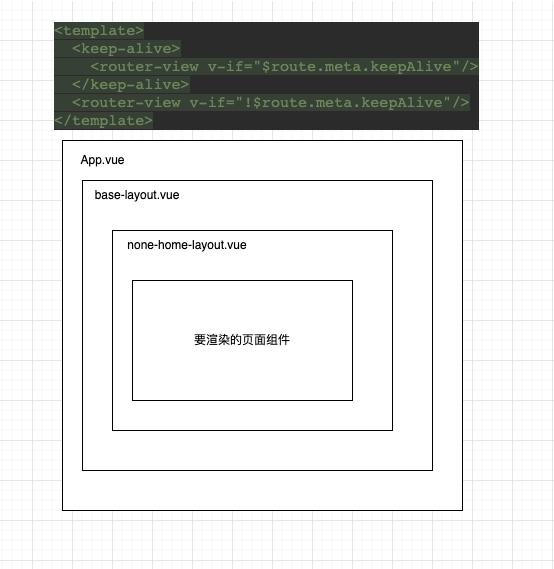
keep-alive组件在app.vue中使用存在问题
约定:仅在app.vue中使用keep-alive
vue
<template>
  <keep-alive>
    <router-view v-if="$route.meta.keepAlive"/>
  </keep-alive>
  <router-view v-if="!$route.meta.keepAlive"/>
</template>
js
// router.js
const Pure = {
    name: 'RouteView',
    render: (h) => h('router-view')
}
const routes = [
    {
        path: '/',
        name: 'home',
        redirect: '/fly-task',
        component: BaseLayout,
        children: [
            {
                path: '/fly-task',
                name: 'FlyTask',
                component: () => import('@/layouts/none-home-layout'),
                redirect: '/fly-task/normal',
                meta: {title: '飞行任务管理'},
                children: [
                    {
                        path: '/fly-task/normal',
                        name: 'fly-task-normal',
                        redirect: '/fly-task/normal/scene',
                        component: Pure,
                        meta: {title: '常态任务管理'},
                        children: [
                            {
                                path: '/fly-task/normal/scene',
                                name: 'PatrolManageScene',
                                component: () => import('@/views/fly-task/normal/scene/index.vue'),
                                meta: {title: '飞行场景管理', keepAlive: true},
                            },
                            {
                                path: '/fly-task/normal/scene-detail',
                                name: 'PlanManageDetail',
                                component: () => import('@/views/fly-task/normal/scene-detail.vue'),
                                meta: {title: '飞行场景详情', keepAlive: true},
                            }
                        ]
                    },
                ]
            }
        ]
    }
]由于飞行场景管理路由与飞行场景详情使用的是同一个layout,那么存在以下问题:
- 两者的keepAlive都是true:在
飞行场景管理切换到页码之后,点进飞行场景详情页面,再点击返回按钮到飞行场景管理页面。会发现页面的列表并没有被缓存 飞行场景管理的keepAlive为true,飞行场景详情的keepAlive为false:在进行上述操作之后,页面的列表符合预期被缓存了。
那么为什么会存在上述问题?
由于是在App.vue中使用的keep-alive来控制组件的缓存与否,那么意味着最终缓存的组件其实是BaseLayout组件,而组件实例通过data对象(非options中的data) 中的keepAlive属性判断是否被缓存。当从要缓存的子组件A切换到要缓存的子组件B时,会将已经缓存的组件A替换成B,即会出现第一种问题。这也能解释为什么会出现第二种情况, 因为无需缓存的组件C没有替换掉需要缓存的组件A,而是新建了一个BaseLayout组件。
验证
BaseLayout的actived钩子函数中添加如下代码:
js
export default {
    activated() {
        console.log(this.$vnode.parent.componentInstance)
        const {cache, keys} = this.$vnode.parent.componentInstance
        console.log('activated cache: ', cache)
        console.log('activated keys: ', keys)
    },
}
两者的keepAlive都是true
- 首次进入列表页时
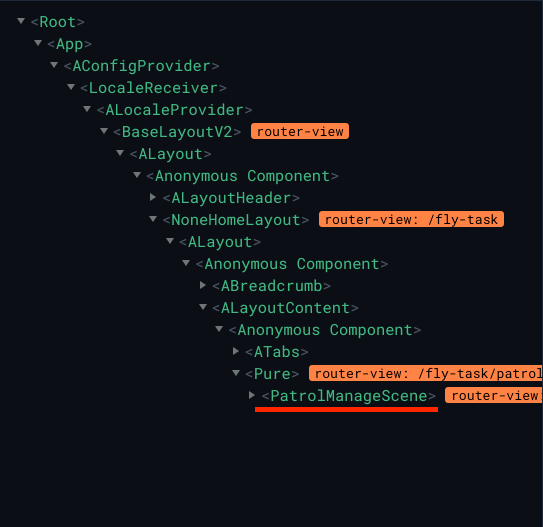
- 点击
查看进入详情页
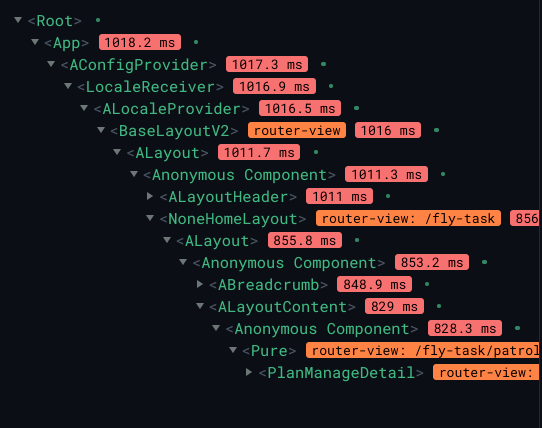
可以发现即使添加了keepAlive为true,但是页面也已经被替换掉。
飞行场景管理的keepAlive为true,飞行场景详情的keepAlive为false
- 首次进入列表页时
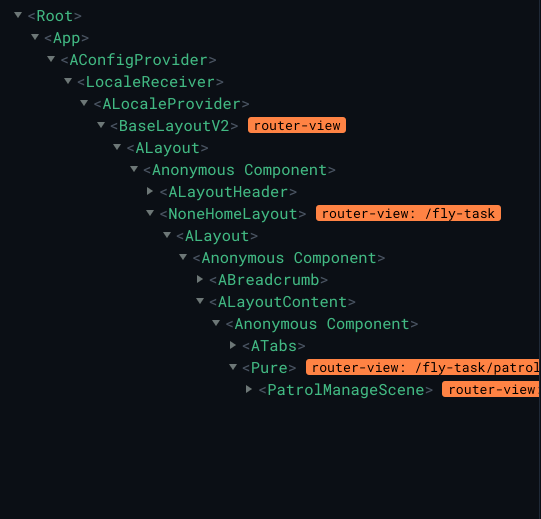
- 点击
查看进入详情页
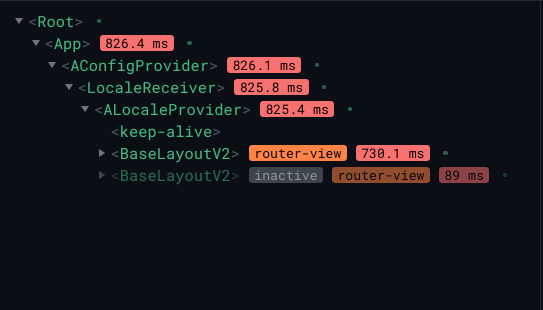
可以发现新生成了一个BaseLayout组件,并没有替换掉原来的组件。